
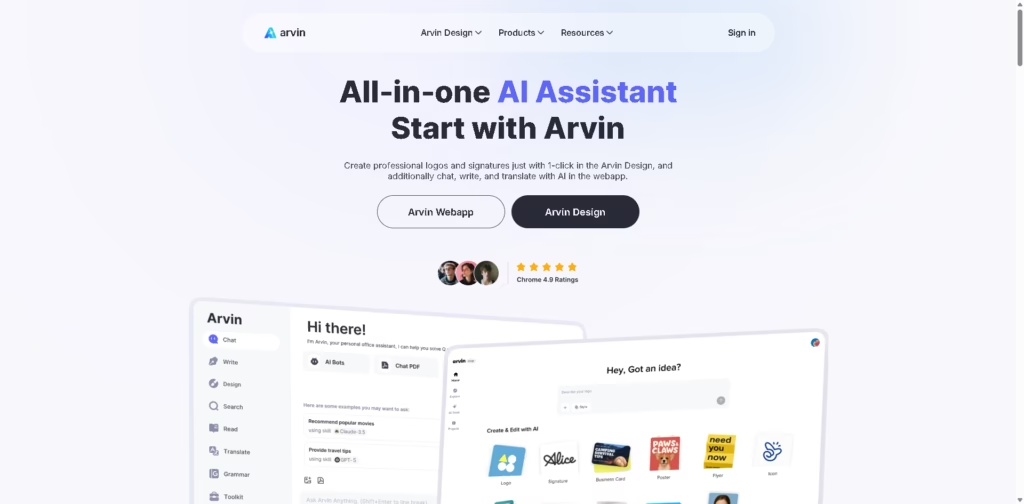
What It Does
Arvin is an all-in-one AI assistant available through a web app and browser extension. It combines AI chat, writing, translation, image generation, PDF tools, webpage summarization, and design tools such as logo and signature generation. It supports multiple AI models, including GPT, Claude, and Gemini.
A typical workflow could involve opening a webpage, using Arvin’s browser tools to summarize or translate its content, then asking the AI assistant to turn the information into an article or email. Users can also upload PDFs or images for AI-assisted conversations and use its Design separately to create logos, signatures, or business cards.
Quick Verdict
- Best for: Combining AI chat, writing, translation, and lightweight design tasks
- Skip if: You need a specialized professional design or document-management platform
- Key Advantage: Broad collection of AI tools in one ecosystem
- Top Alternative: ChatGPT
At a Glance
| Feature | Details |
|---|---|
| Category | AI Assistant & Productivity Platform |
| Pricing Model | Not specified |
| Free Tier | Yes |
| Platform | Web, Chrome Extension |
| API | Not specified |
| Primary Strength | Multi-purpose AI assistance |
| AI Models | GPT, Claude, Gemini |
| Browser Support | Chrome |
Key Features
- Chats with multiple AI models, including GPT, Claude, and Gemini.
- Generates articles, emails, and other written content from prompts.
- Creates logos, signatures, and business cards through Arvin Design.
- Summarizes PDFs, webpages, and selected page areas.
- Translates webpages and supports translation into 25+ languages.
- Provides background removal, background generation, and image creation tools.
Best For
- Researching and summarizing online information
- Drafting articles and email responses
- Translating webpages and written content
- Creating basic logos, signatures, and business cards
- Working with PDFs and uploaded images
Pros & Cons
Pros:
- Combines chat, writing, translation, image, and PDF tools.
- Supports multiple AI models in a single application.
- Browserr extension provides AI features directly while browsing.
- Includes dedicated AI design tools for logos and business cards.
Cons:
- The supplied information does not specify detailed pricing or credit limits.
- The platform covers many tasks rather than specializing in a clejix professional workflow.
- API availability is not specified in the supplied information.
Alternatives & Comparisons
| Alternative | Best For | Key Difference vs. This Tool |
|---|---|---|
| ChatGPT | General AI chat, writing, research, and file work | Broader general-purpose AI ecosystem |
| Claude | Long-form writing and document conversations | More focused on AI conversation and document-oriented work |
| Canva | Visual design and branded content | More focused on visual design and content creation |
Arvin sits between a general AI assistant and a collection of lightweight productivity and design tools. Choose it when you want browser-based AI assistance alongside writing, translation, image, PDF, and basic design utilities in one service.
Frequently Asked Questions
What is Arvin?
Arvin is an AI web application and browser extension that provides AI chat, writing, translation, research, and creative tools.
Which AI models does Arvin support?
The supplied information states that Arvin supports GPT, Claude, and Gemini.
Can Arvin summarize webpages?
Yes. Its browser extension includes AI summarization, and its feature list also includes area-based webpage summarization.
Can Arvin work with PDFs?
Yes. Users can chat with uploaded PDFs, and Arvin also provides PDF conversion tools for PDF-to-Word, PDF-to-PNG, and PDF-to-JPG.
Can Arvin create logos?
Yes. Arvin Design can generate logos, signatures, and business cards, and users can modify logos using templates.
ToolsPedia Rating
- Performance & Speed: 4.2/5.0
- Ease of Setup: 4.5/5.0
- Feature Depth: 4.4/5.0
- Value for Price: 4.0/5.0
- ToolsPedia Score: 4.3/5.0
Final Thoughts
Arvin is designed for users who want several everyday AI capabilities without switching between separate services for chat, writing, translation, browsing, images, and basic design. Its combination of a web app, Chrome extension, and Arvin Design makes it particularly suited to mixed productivity workflows. Start with the free option and test the specific AI and design tools you expect to use most.
















