
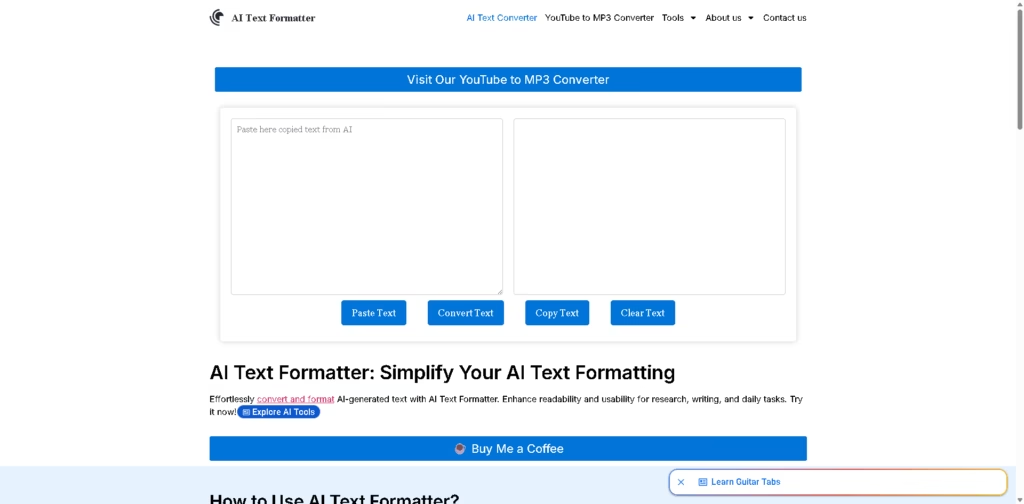
What It Does
AI Text Formatter is a web-based text formatting utility designed to convert AI-generated or plain text into more structured, readable output. The supplied site positions it for research, writing, and everyday text workflows, while also providing separate tools for LinkedIn formatting and case changes.
A typical workflow is to copy text from an AI tool, paste it into AI Text Formatter, click Convert, and copy the resulting formatted text. The converted text can then be pasted into applications such as Microsoft Word, Excel, or Google Docs for further use.
Quick Verdict
- Best for: Quickly formatting AI-generated text for reuse
- Skip if: You need advanced AI writing or editing features
- Key Advantage: Simple browser-based text conversion
- Top Alternative: QuillBot
At a Glance
| Feature | Details |
|---|---|
| Category | AI Text Formatting |
| Pricing Model | Not specified |
| Free Tier | Not specified |
| Platform | Web |
| API | Not specified |
| Primary Strength | Simple AI text formatting |
| Additional Tools | LinkedIn Text Formatter, Case Converter |
Key Features
- Converts AI-generated text into a more structured and readable format.
- Provides a dedicated LinkedIn text formatter for styled social posts.
- Converts text between uppercase, lowercase, title case, and other cases.
- Supports copy-and-paste workflows for Word, Excel, Google Docs, and similar applications.
- Provides separate browser-based tools from a single tools section.
Best For
- Formatting AI-generated drafts before moving them into documents
- Preparing styled text for LinkedIn posts
- Converting text between different capitalization formats
- Cleaning up text for research and writing workflows
- Moving formatted AI output into Word or Google Docs
Pros & Cons
Pros:
- Simple paste-convert-copy workflow.
- Includes separate LinkedIn formatting and case-conversion utilities.
- Works directly through a web interface.
- Suitable for basic text-processing tasks without a complex workflow.
Cons:
- Pricing information is not specified in the supplied source.
- API availability is not specified.
- The supplied information does not document advanced editing or customization controls.
Alternatives & Comparisons
| Alternative | Best For | Key Difference vs. AI Text Formatter |
|---|---|---|
| QuillBot | Paraphrasing and rewriting | Offers broader AI-powered rewriting capabilities |
| Grammarly | Writing assistance and editing | Focuses more heavily on grammar, style, and writing suggestions |
| Wordtune | AI rewriting | Provides AI-based rewriting and tone adjustments |
AI Text Formatter fits the market as a lightweight browser utility focused primarily on converting and formatting text rather than comprehensive AI writing assistance. Choose it when you need a simple formatting workflow and do not require the broader rewriting and editing features offered by dedicated writing platforms.
Frequently Asked Questions
Is AI Text Formatter an AI writing generator?
The supplied homepage describes it as a tool for converting and formatting AI-generated text, but the available information does not clearly document a separate text-generation capability.
Can I use AI Text Formatter for LinkedIn posts?
Yes. The site provides a separate LinkedIn Text Formatter designed to add bold, italic, and styled text to LinkedIn posts.
Does AI Text Formatter have a case converter?
Yes. Its Case Converter tool supports uppercase, lowercase, title case, and other text-case conversions.
Can I copy the converted text into Microsoft Word?
Yes. The documented workflow specifically describes copying the converted output and pasting it into Microsoft Word, Excel, Google Docs, and other applications.
Does AI Text Formatter offer an API?
API availability is not specified in the supplied product information.
ToolsPedia Rating
- Performance & Speed: 4.0/5.0
- Ease of Setup: 4.5/5.0
- Feature Depth: 2.8/5.0
- Value for Price: 3.5/5.0
- ToolsPedia Score: 3.7/5.0
Final Thoughts
AI Text Formatter is best viewed as a lightweight text utility rather than a full AI writing platform. Its straightforward conversion workflow and additional LinkedIn and case-formatting tools make it useful for basic formatting tasks, but the supplied information does not establish advanced editing, API, or pricing capabilities. Try the web tool with a representative piece of text first to see whether its formatting output matches your workflow.
















